The fastest way to add 'Build a Website in a Day' to your services

- The problem with basic link lists: Why standard link-in-bio tools might be costing you leads and keeping your booking calendar empty.
- Top all-in-one alternatives: A breakdown of tools that go beyond basic links by offering built-in scheduling infrastructure, client booking, and portfolio features.
- Converting followers to clients: How to upgrade your social media funnel to actively sell your services rather than just redirecting traffic.
You’ve spent months funneling your social media followers to a static wall of links that isn’t exactly cute and sends people to 10 different places… yet your DMs remain suspiciously quiet. It’s frustrating to see the view counts climb on your latest reel while your booking calendar stays wide open.
That wall of plain links might have been a simple starting point, but it lacks the soul of your brand. It gives your potential clients zero context on who you are, what you actually offer, or why they should trust you with their business.
The good news is that you don’t have to settle for a bare-bones link-in-bios that stop your momentum in its tracks.
In this guide, we’re looking at the best Linktree alternatives today that do the heavy lifting for you by turning a simple bio link into a high-converting hub.
The problem is that most social media users aren’t looking for a link-in-bio that just lists resources, but they’re looking for a clear, frictionless path to working with you. When you force potential clients to navigate a cluttered list just to find your calendar, you lose their interest (and their booking) in seconds. You turn a passive profile into an active sales tool that does the heavy lifting for you by upgrading to a high-converting hub.
These platforms go beyond just shuffling traffic; they have built in portfolios, direct booking tools, digital storefronts, and customization options that allow you to match your branding to help you turn those passive profile visitors into actual, paying customers.
Interested in knowing what these alternatives are?
Then let’s jump right in.
Why Look for a Linktree Alternative
Before we get into the list, let’s talk about why so many people are looking for a change.
Sticking with a basic link page often feels like you’re leaving money and professional credibility on the table.
Here’s why it’s time to move on:
- The free plan comes with clunky branding that distracts from your own identity and leaves you with almost zero customization options.
- You get a sterile list of links that fails to show off your work, leaving visitors guessing about your actual expertise.
- There’s no native way to book clients, accept payments, or sell digital products, which forces you to patch together a messy, multi-tool setup.
- Your page ends up looking like every other generic bio on the internet, so you lose the chance to stand out from your competition.
- Paying for premium features to get basic functionality adds up fast, making it an expensive way to host just a few simple URLs.
- You’re forced to juggle a fragmented tech stack. Because a basic link-in-bio is just a wall of links, you often need 2-5+ additional tools just to handle scheduling, payments, and portfolios, increasing your monthly costs and management headache.
If any of these sound familiar, here are the best alternatives, starting with the one that replaces Linktree and the five other tools you're probably also paying for.
Keep reading!
The Best Linktree Alternatives in 2026
Here are the top picks, chosen based on features, value, and how much they actually help you convert visitors into clients or customers.
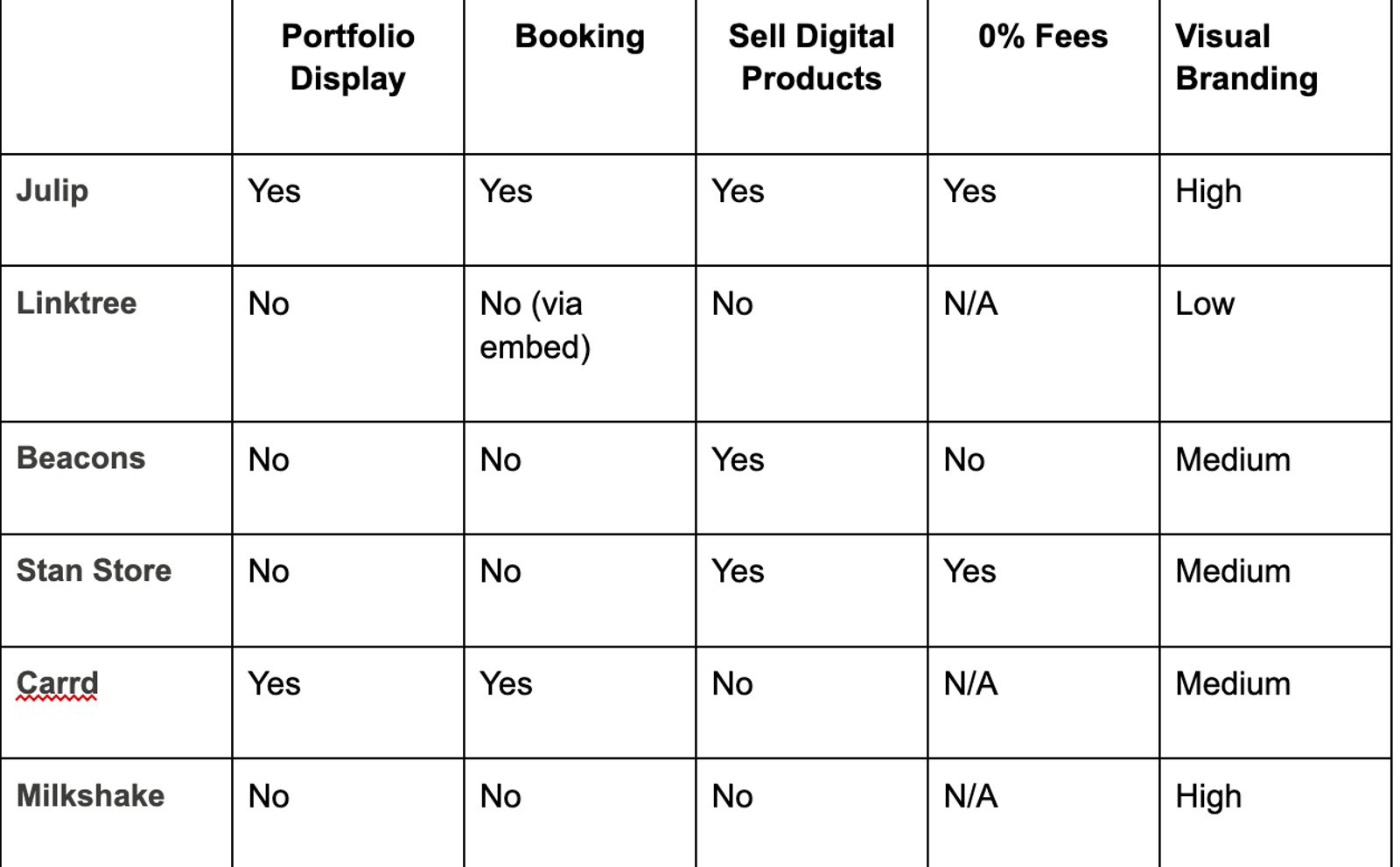
Quick comparison: Linktree vs Alternatives
Here's how each tool stacks up on the features that matter most.
1. Julip: Best Overall Linktree Alternative for Service Providers
First on our list is Julip. For service providers, your social media presence is often the first point of contact for a potential lead. Instead of sending traffic to a generic list that forces visitors to click multiple times, Julip acts as a dedicated conversion hub. You remove the friction that often stops visitors from taking the next step, ensuring that your bio works as hard as you do to build trust and generate revenue, by centralizing your professional identity and sales process in one place.
You can think of Julip as a complete visual website-in-bio, not just another list of links. It gives you a full home base that lives right where your social media bio is. You can host your portfolio, list services, handle booking, sell digital products, and even link to your external storefront without any coding or design experience.
It’s perfect if you’re growing your business on Instagram, LinkedIn or TikTok and want to keep things simple.
Julip changes the game by stopping the need to send people away to random URLs; instead, it shows them exactly what you do. And while you only have 150 characters to tell your story in your Instagram or TikTok bio, Julip gives you a dedicated “About” page to share your background, build trust, and highlight your expertise.
Remember that visitors land on a page that shares your story, showcases your best work, and gives them a clear path to book a call or buy your product.
Everything stays right there in the bio, so no one has to bounce around just to see what you offer.
Key Features:
- Visual portfolio that looks great on any phone or desktop and can be built in minutes
- Built-in booking and paid calls so you can finally retire that Calendly account
- Sales tools for digital products that come with 0% platform fees
- A clean services menu and a dedicated about page to build trust
- A visual storefront to showcase your affiliate links or physical products
- Email collection forms to build your audience outside of social media
- Testimonial sections to show off those happy client reviews
- FAQ section to remove the back and forth
- Total control over your brand colors
- Simple analytics that show you what’s actually working
Pros:
This website builder is a serious time and money saver. You can ditch your subscriptions for Linktree, Calendly, Canva portfolios, and payment processors, because this one $19/mo plan handles it all.
You keep every cent of your earnings, and the design is set up to look pro on any device. Plus, since they have a 14-day free trial, you can test it out risk-free. Most users end up saving about $200+ a year just by consolidating all their tools.
Cons:
Julip is made for people getting business through social media. So if you need a massive, complex site with hundreds of blog posts for heavy SEO, you might want to stick with a dedicated blogging platform and just link to it from your Julip page.
Pricing:
You can grab a plan for $19/month if you pay annually, or $25/month if you prefer to go month-to-month. There’s also a 14-day free trial.
Best for:
If you’re a freelancer, social media manager, photographer, artist, or coach, this is your new home base. It’s easily one of the best Linktree alternatives available because it transforms your bio from a simple directory into a real business hub.
2. Beacons: Best for Creators Who Want Built-in Monetization
Beacons positions itself as a full-blown monetization platform that just happens to have link-in-bio features attached. It makes it easy to handle things like digital product sales, tip jars, and even brand deal management right from your profile page.
Pros:
You get a solid suite of tools for making money, and they do offer a free plan to get you off the ground. The whole setup is tailored specifically for content creators who are already living on platforms like TikTok.
Cons:
That free plan comes with a catch: they take a 9% cut of your revenue! That’s a LOT, by the way. If you want the real power, you’ll be paying between $10 and $30 a month. Visually, it still leans heavily toward the standard link-page look rather than a complete website experience. You also won't find native booking tools here, which is a major hurdle if you're trying to sell your time as a service-based pro.
Pricing:
You can start for free if you don't mind the 9% transaction fee, or upgrade to their paid tiers ranging from $10 to $30 per month.
Best for:
If your main goal is selling digital downloads or managing brand sponsorships, this works well. It’s quite a solid player among Linktree alternatives, even if it lacks the portfolio-first design that visual creators usually need.
3. Stan Store: Best for Digital Product Sellers
Stan Store focuses heavily on helping you sell digital products and courses directly from your profile. It has become a favorite among online educators and coaches who want a straightforward, easy-to-manage storefront without any technical fuss.
Pros:
The product-selling process is smooth, clean, and quick to set up. You get built-in course hosting, and the cool part is they don’t take a slice of your sales on their paid plans.
Cons:
Now, this one carries a steeper price tag of $29 per month.
It also falls short if you need a professional hub for your business, as it lacks:
- Visual versatility: It’s not very visual and feels more like a list than a website
- Key business pages: You won't find native ways to host an “About” page, a visual portfolio, or an FAQ section
- Affiliate management: Affiliate link organization feels very similar to a standard Linktree rather than a branded storefront
Pricing:
Stan Store comes in at $29 per month.
Best for:
Online coaches and course creators who just want to sell products. If you’re a visual creative, you might find it too limiting compared to other alternatives to Linktree that actually showcase your work and offer client booking.
4. Later (link in bio): Best for Scheduling-Focused Creators
Later’s link-in-bio tool gives you a clickable, grid-style version of your actual Instagram feed. You can link each specific post to a custom URL, making it a natural extension of your social content because it ties directly into their popular scheduling platform.
Pros:
If you’re already paying for Later to handle your posting schedule, this feature is super convenient. It keeps your link-in-bio page looking like a mirror image of your feed, which feels very native to the Instagram experience.
Cons:
You need an active Later subscription to use it, so it’s an added cost if you don’t already use their scheduling tools. You won’t find any built-in options for booking clients, selling digital products, or even adding a simple “about me” page. It really only works if your Instagram feed happens to be a perfect portfolio on its own.
Best for:
This is a solid choice for creators who already live in the Later ecosystem and just want a fast way to make their grid shoppable. If you need a proper business hub, this won't be one of your best Linktree alternatives, but it’s a smart shortcut for keeping your followers engaged with your latest posts.
5. Carrd: Best for Minimalist Single-page Sites
Carrd gives you a straightforward way to build a simple one-page website. It’s a popular pick if you want an “about me” page or a basic digital business card that goes a step further than the typical wall of links.
Pros:
The price is quite hard to beat, with a free plan available and a Pro version that starts at just $19 per year. It keeps things clean, minimal, and lets you attach a custom domain once you go Pro.
Cons:
We have to say, you get what you pay for in terms of features. There’s no way to take bookings, sell digital products, or even track visitor analytics. While the pages look nice, they’re not designed to turn a visitor into a paying client. It functions more as a static brochure than a business tool.
Best for:
If you have a near-zero budget and just need a clean, simple landing page to show you exist, this works. It’s an option among alternatives to Linktree for hobbyists, but you’ll likely outgrow it the moment you decide to actually start selling services or products.
6. Milkshake: Best for Instagram-only Mobile Users
Lastly, Milkshake lets you build a simple, swipeable website right from your phone. It’s built for Instagram creators who want a more visual experience than a standard link list but prefer to do all their editing on the go rather than sitting at a desk.
Pros:
The app is free, fast, and gives you pretty, card-style layouts that you can put together in minutes. It handles the entire design process within their app, making it incredibly easy to get started.
Cons:
You sacrifice power for convenience here. The platform lacks tools for booking clients, selling digital items, or seeing deep visitor analytics on the free tier. It serves as an aesthetic refresh for your profile, but it falls short if you need actual business software.
Best for:
If you’re a casual creator who just wants a nicer-looking bio page without dealing with desktop settings, this fits. It’s one of the more unique Linktree alternatives if you want to keep things basic, but it won’t give you the heavy-duty features you'd find in a full business hub.
Frequently Asked Questions about Linktree Alternatives
1. Is there a free Linktree alternative?
Yes, you have a few options if you’re just looking for a free Linktree alternative. Tools like Carrd and Milkshake have solid free tiers, and Beacons offers a free version, though keep in mind they do take a 9% cut of your sales. If you want a truly business-ready setup, Julip offers a 14-day free trial that lets you test their full feature set without spending a dime.
2. What is better than Linktree?
If you’re tired of a simple list and actually want to book clients or sell products, Julip is easily the better than Linktree upgrade. It gives you the same link functionality you’re used to, but adds a professional portfolio, a booking calendar, a digital storefront, and a proper about page. You get the whole business package for $19 a month with 0% platform fees on your sales.
3. Can I use a Linktree alternative without a website?
Definitely. Platforms like Julip, Beacons, and Stan Store are built specifically to replace the need for a separate, traditional website. Julip in particular acts as a fully functional website that lives right at your bio link, so you can host your services, your shop, and your portfolio without ever needing to buy a domain or mess with hosting.
4. Does Linktree take a percentage of sales?
Linktree doesn't really handle product sales natively, so this isn't usually an issue there. However, most other tools that do let you sell products will take a cut of your revenue, especially on their free plans. Julip stands out here because they charge 0% on your bookings, digital products, and services, meaning you get to keep every dollar you earn.
So, what's the best Linktree alternative?
If you want to move beyond a simple list of links and start running a real business from your social media bio, Julip is the clear winner. It’s the only tool here that acts as a complete business hub for your bookings and sales while replacing the need for multiple extra subscriptions.
Head over to myjulip.com to start your trial and turn your bio link into your most valuable business asset today!