The fastest way to add 'Build a Website in a Day' to your services

- Top Artist Platforms Reviewed: We rank the best portfolio tools like Julip and Squarespace based on ease of use, mobile layout styling, e-commerce, and monthly subscription pricing.
- Eliminating Login Barriers: Portfolios locked behind Canvas or PDF login walls lose potential bookings because clients abandon creators when forced to create accounts just to view visual artwork.
- Essential Creative Features: Successful online art businesses require integrated payment options, commission management tools, and zero percent platform transaction fees on digital downloads to maximize overall revenue.
Artists who have spent several years perfecting their skill lose out on potential clients solely because their online presence is just a collection of links or their Canva portfolio is locked somewhere behind a login screen. That one extra step costs real bookings. If someone has to create an account just to see your work, they will not bother.
This article gives you a ranked list of the best website builders for artists, tested against what actually matters: portfolio display, booking, selling work, ease of use, and price. No guesswork, no filler.
What Do Artists Need from a Website Builder?
Not every website builder is built with artists in mind. Before jumping into the list, here is what separates a useful platform from one that just looks good on paper.
- Visual portfolio display is non-negotiable. Any device should be able to load your work without requiring the visitor to check in. Canva portfolios and PDFs are clunky on mobile devices at that login wall every time.
- Mobile-first layout matters because most people clicking your bio link are on their phones. The site should look sharp automatically, with no manual tweaking required on your end.
- Built-in booking and payments save you from paying for Calendly and a separate payment processor on top of your website subscription. Artists taking commissions or discovery calls need this built in.
- The ability to sell digital products which includes presets, templates, prints, courses, with no steep platform fees, that keeps more money in your pocket throughout every sale.
- Fast, no-code setup implies you should be ready in mere minutes, not days. If you require a skilled developer to launch your website, the tool is not built for you.
Best Website Builders for Artists from Our Top Picks for 2026
Here are the best options, ranked based on the criteria above.
1. Julip: Best for Artists Who Build Their Business on Social
Julip is a visual website-in-bio designed for artists and producers that expand their following on TikTok, Pinterest, and Instagram. From a single bio link, Julip operates as a complete website with a portfolio, services, booking, digital items, and email gathering. No domain, hosting, or design expertise are required.
Key features:
- Portfolio that auto-formats for every screen
- Built-in booking and paid calls
- Digital product sales with 0% platform fees
- Visual storefront and services menu
- About page, testimonials, and email collector
- Brand color customization
Real examples:
- Kota uses his dedicated space at myjulip.com/kota.does.things to highlight his creative eye as a photographer and filmmaker, effortlessly connecting with clients straight from his social media bio.
- Lindsay shares her large-scale artwork at myjulip.com/lindsayallisonc, tracking her mural projects, managing local bookings, and giving her followers a seamless way to support her craft directly.
- Kesha showcases her journey at myjulip.com/keshaomarali, where she sells original pieces, offers custom art commissions, and links her creative channels to build a sustainable full-time art business.
Pros:
- All-in-one solution that takes the role of Stripe, Linktree, Calendly, and a Canva portfolio
- 0% transaction fees on digital product sales
- Better customer experience with quick response time over queries
- Automatic mobile and desktop layout, no manual adjustments
- Saves artists an average of $200 per year compared to running separate tools
- 14-day free trial available
Cons:
- Designed specifically for social-first artists. Not the best option if you require a fully custom-coded website or a complicated multi-page blog.
Pricing: $19/month billed annually, or $25/month. 14-day free trial available.
Best for: Photographers, muralists, filmmakers, UGC creators, and illustrators who want to get clients through social media.
2. Squarespace: Best for Fine-Art Portfolios with E-Commerce
Squarespace is a hyped and pleasing general website builder on the market right now. With their simple layouts, full-bleed photos, and sophisticated typography, its gallery themes are designed for creatives and work well for photographers and artists showcasing high-resolution work.
Pros:
- All-around top-notch design templates
- Robust online sales platforms for limited editions, prints, and originals
- Dependable hosting with strong integrated SEO capabilities
Cons:
- Monthly e-commerce plans range from $23 to $49, which quickly adds up
- Greater learning curve compared to more basic tools
- No built-in social-first bio link
- Not as easy as they say it is
- Transaction fees apply on lower-tier plans
Pricing: Pricing starts from $25/month.
Best for: Visual artists and creators who want to focus on e-commerce as their main priority while maintaining a classic standalone website.
3. Wix: Best for Artists Who Want SEO and Marketing Tools
With more than 900 layouts and an adaptable drag-and-drop editor, Wix is one of the most popular website builders available. For artists who wish to blog, manage local SEO, or gradually establish a more content-rich web presence, it works well.
Pros:
- Strong SEO tools built into the platform
- 900+ templates to start from
- Free plan available for testing
- Large support community and tutorials
Cons:
- The free plan displays Wix branding on your site
- Editor flexibility can create inconsistent layouts if you move too many elements around
- Not built for social-first use or quick bio link setup
- Poor customer service as users do not accurate and prompt reply to their queries
Pricing: The basic pricing plans start from $17/month.
Best for: Artists who want to manage a local art business with a content strategy, blog, or create an SEO-focused website.
4. Format: Best for Photographers Needing Client Proofing
Format is built specifically for photographers and visual artists. It provides print lab connectors, client proofing workflows, and clean gallery templates, all essential tools for properly presenting work to clients.
Pros:
- Purpose-built for visual creatives
- Strong image-first layouts with minimal distraction
- Password-protected client galleries for proofing
Cons:
- No built-in booking or scheduling tools
- No digital product sales functionality
- Limited marketing and growth features
Pricing: Basic plan starts from $10/month.
Best for: Professional photographers who need a clean portfolio and client delivery workflow, nothing more.
5. Linktree: A Starting Point, Not a Final Destination
Linktree is where most artists start. It is free, quick, and puts multiple links in one place. For getting something live the same day, it does that job.
Cons:
- No portfolio, no booking, no digital product sales, and no about page
- Brands and clients clicking your bio link cannot evaluate your work from a list of URLs
- Gives visitors no reason to stay or take action
If you are currently on Linktree and wondering why your bio link is not converting, this is likely why.
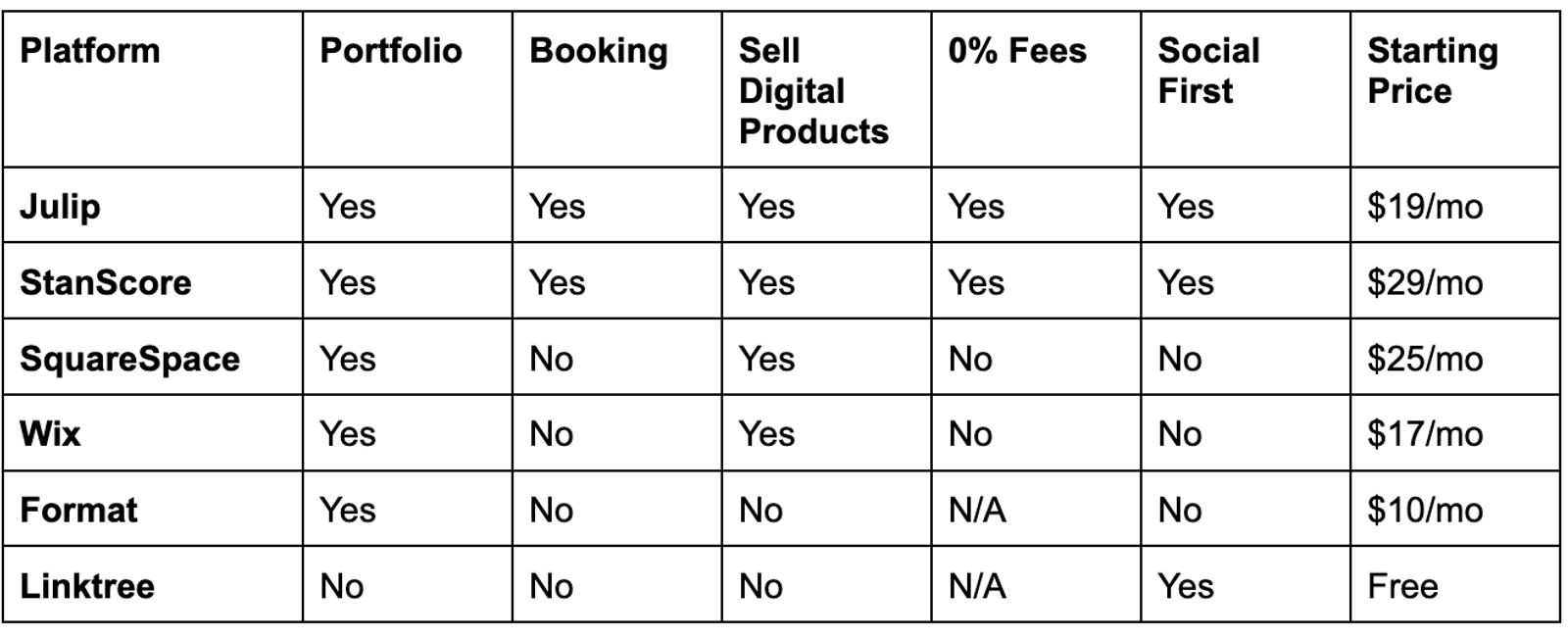
Comparison Table
Here is how the top picks compare at a glance.
Conclusion
Julip is the most obvious solution if you are an artist expanding your social media following and require a single platform that manages your portfolio, reservations, product sales, and email collecting without combining five different subscriptions. It was built for exactly how artists work today.
For artists who want a traditional standalone website with strong e-commerce, Squarespace holds up. For SEO-focused content builders, Wix makes sense. Format is minimal and reasonably priced for photographers with simple portfolio requirements.
The best website builder for artists is the one that fits how you actually work and where your audience already finds you. Start there.
FAQ
Do artists need a website?
Yes. An artist's sole complete online asset is a website. Without warning, social media companies alter their algorithms and reduce their organic reach. Even a one-page website that is linked from your bio has the power to turn followers into paying customers and appointments. Owning that space matters.
What is the easiest website builder for artists?
Julip is the easiest website builder for artists who are social-first. There’s no need of learning any coding skill or gaining design experience to get live in a matter of minutes. Even though the whole setup process can be a little more time-consuming, Squarespace offers beginner-friendly templates for a standard and effective standalone website.
Is there a free website builder for artists?
Wix and Linktree both offer free plans, but they include platform branding and significantly limited features. Julip offers a 14-day free trial on its full feature set, which gives you a better picture of what a free website builder for artists can actually do before you commit.