The fastest way to add 'Build a Website in a Day' to your services

Creators pour endless hours into content... but when it comes to their portfolio, things get a little... unhinged. Brands want to hire you. They want to see your work. They want to hand you money. But a lot of creator portfolios accidentally make brands go: "Aww... next."
The good news? These mistakes are extremely common and extremely easy to fix. Here's the 2026 guide to cleaning up your portfolio so it actually converts into paid brand deals.
Mistake #1: Including Every Piece of Content You've Ever Made
A portfolio is not a scrapbook. Brands do not need to see that random collab from 2022.
THE FIX:
- Show 5–8 of your best, most aligned pieces.
- Group them by niche (beauty, wellness, lifestyle, home, etc).
- Quality > quantity.
Brands should think: "Oh, THIS is what they can do for us." Not: "Oh, they've created 400 things and we're overwhelmed."

Mistake #2: Making Your Portfolio a Canva PDF
We need to talk about Canva portfolios. They're cute… until:
- The layout breaks on mobile
- The file takes forever to load
- Canva forces the viewer to log in
- The fonts shift like they're in a tsunami
- Your client is reviewing it on their phone in the Uber
Canva is amazing for graphics. It is not amazing for portfolios.
THE FIX:
Use a simple portfolio webpage that:
- Loads instantly
- Doesn't require login
- Is mobile-friendly and desktop-friendly
- Doesn't need exporting
- Can be updated in seconds
(Aka: use Julip, your website-in-bio.)
Mistake #3: Hiding Your Services (Or Making Them Confusing)
You would be shocked how many creators forget to list their services, deliverables, pricing (optional), add-ons, and usage rights. Clients shouldn't have to DM you "what do you charge?"
THE FIX:
List your offers clearly, cleanly, and confidently. Clarity attracts clients. Confusion... doesn't. Or simply add a FAQ section (which you can also do on Julip).
Mistake #4: Writing a Boring or Overwhelming "About Me"
Your About section should be:
- Short
- Clear
- Personal
- Professional
But many creators make one of two mistakes: writing their entire life story, or giving zero actual information.
THE FIX:
Use this formula:
- 1 sentence about who you are
- 1 sentence about what you create
- 1 sentence about why brands love working with you
- 1 sentence about what types of projects you're perfect for
That's it. Four lines. Life-changing.
Mistake #5: No Testimonials (a.k.a. No Receipts)
Even one kind review can make a huge difference in how potential clients see you. But many creators forget to include brand wins, email compliments, sweet DM messages, and success metrics.
THE FIX:
Add at least 2–3 short testimonials. Receipts = revenue.
Mistake #6: No Clear CTA to Book You
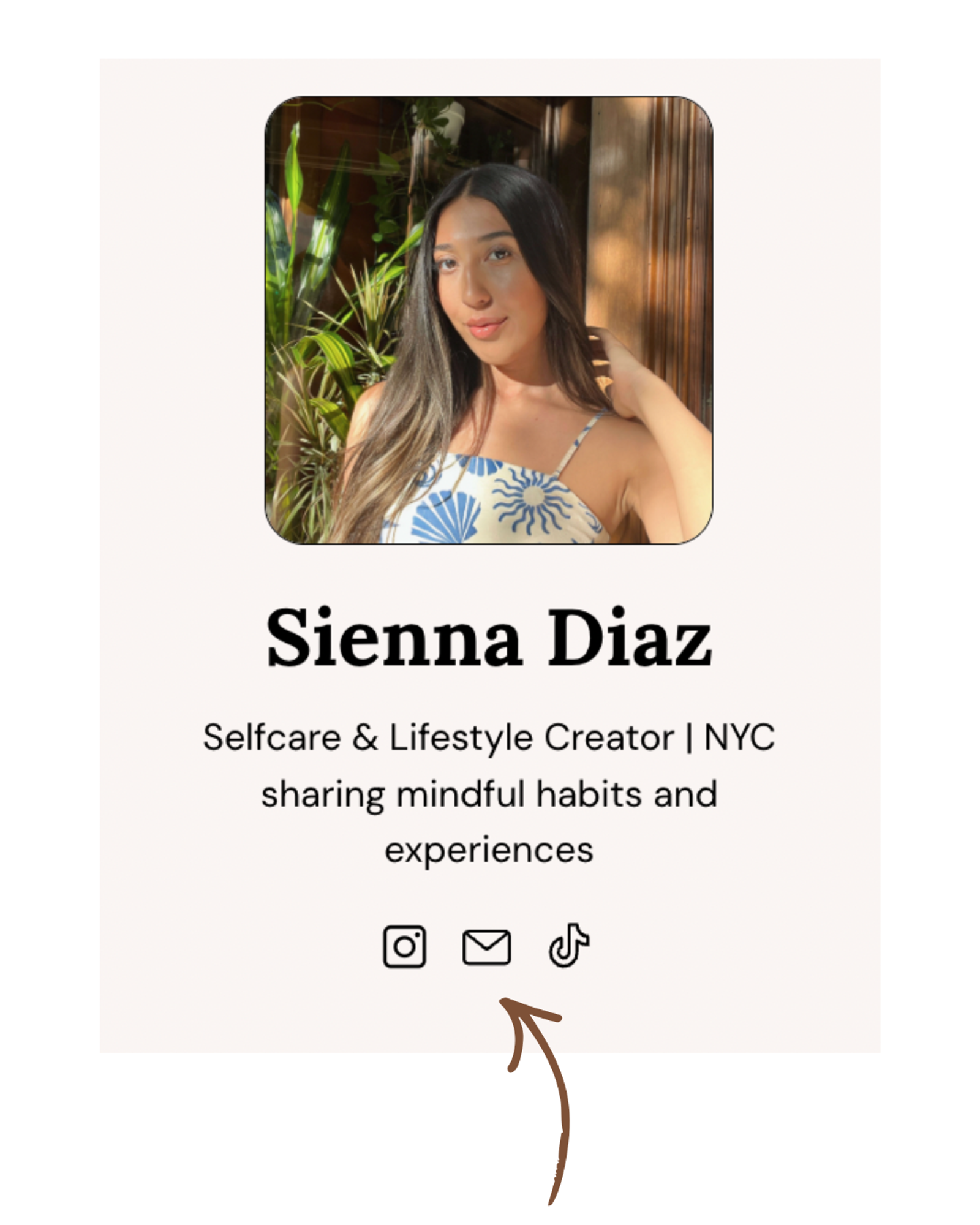
This is a MAJOR one. Creators lose deals because the brand looks at their portfolio and genuinely cannot figure out how to contact them.
THE FIX:
Add:
- "Book a Call"
- "Work With Me"
- "Request Pricing"
- "Contact Me"
Make it obvious. Make it impossible to miss. We love having our email linked at the top with a simple copy and paste.
Mistake #7: Using Too Many Links (The "Link in Bio Maze")
Nothing kills a client's enthusiasm like opening your bio and seeing a Linktree, inside it, a wall of over 10+ mystery links, more links hiding inside those links, and images that are the size of a grain of rice.
THE FIX:
One link. One portfolio. One scroll. This is why creators are switching to Julip. It consolidates everything you need (portfolio, shop, services, booking, digital products) into one clean link.
Mistake #8: Over-Branding or Under-Branding
Two extremes:
- Chaotic, overly designed layouts with 19 fonts
- Plain, generic layouts that don't feel like you
Both send the wrong message.
THE FIX:
Choose a simple, aesthetic design that lets your work shine. You want your portfolio to feel like your brand, not a collage of mismatched templates fighting for attention.
Mistake #9: Forgetting to Include Digital Products or Affiliate Links (a.k.a. Free Money)
Creators don't JUST earn from brand deals, they also earn revenue from:
- Digital products (i.e. guides, templates, etc)
- Affiliate revenue
- Selling their time via calls
- Consulting (helping brands or other creators take social media to the next level)
But many portfolios hide these opportunities or skip them entirely.
THE FIX:
Add a shop or digital product section so clients see you're a multifaceted creator and business owner.
Mistake #10: Making It Hard to Navigate
Clients shouldn't have to scroll for 10 years or zoom in like they're cracking a secret code.
THE FIX:
Your layout should be:
- Clean
- Logical
- Scrollable
- Minimal
- Mobile-first
A portfolio should feel like a smooth experience, not a puzzle.
Mistake #11: Letting It Get Outdated
Old work. Old pricing. Old niches. It happens to the best of us.
THE FIX:
Update your portfolio monthly with:
- New examples
- Better-performing content
- Fresh testimonials
- Updated services
Fresh + relevant = bookable.
Mistake #12: Not Positioning Yourself Clearly
If your niche isn't clear, brands won't know how to place you.
THE FIX:
Explicitly state what niches you specialize in:
- Beauty
- Wellness
- Lifestyle
- Home
- Food
- Fashion
Positioning is everything.
The Portfolio That Actually Gets Clients
A high-converting portfolio is:
- Clean
- Professional
- Simple
- Mobile-first
- Scrollable
- Easy to understand
- Easy to contact
- Personality-forward
- Aligned with your goals
Clients should immediately think: "Oh, we need them." Not: "What am I looking at?"
FAQ
What's the #1 mistake creators make with portfolios?
Including too much content or making the layout overwhelming.
What's better: a PDF portfolio or a link?
A link. It's mobile-friendly, easier to update, and easier for clients to review.
How many examples should I include?
5-8 strong pieces of content grouped by niche.
Do I need a full website for my portfolio?
No. A one-page portfolio link (like Julip) is enough for most brands.
How do I make clients contact me?
Add a clear CTA button: Book a Call, Work With Me, or Contact.