 The fastest way to add 'Build a Website in a Day' to your services

Less back-and-forth, more booked clients. Your next client could be one form away.
You know that exciting feeling when someone reaches out about working with you?
Love that. But what comes next isn't always so exciting.
The endless DMs. The "What's your budget?" emails. The discovery calls with people who aren't quite the right fit. And the constant back-and-forth just to get the information you need to move forward.
That's where forms come in 🙌🏻
Julip forms are customizable forms that help creators, freelancers, and service providers collect client inquiries, qualify potential leads, and gather important information before booking calls.
Whether you're a social media manager, photographer, UGC creator, designer, or freelancer, forms help you spend less time playing email ping-pong and more time doing what you actually love (and getting paid for it).
Let's get into it.
🌶️ TL;DR: How Julip Forms Help You Book More Clients
- Qualify leads before booking calls: Ask potential clients about their budget, goals, timeline, and project needs before committing time to a meeting.
- Collect client inquiries in one place: Add forms to your Julip Services tab so visitors can easily inquire about working together.
- Customize forms for individual services: Ask different questions depending on whether someone wants social media management, photography, UGC content, branding, or coaching.
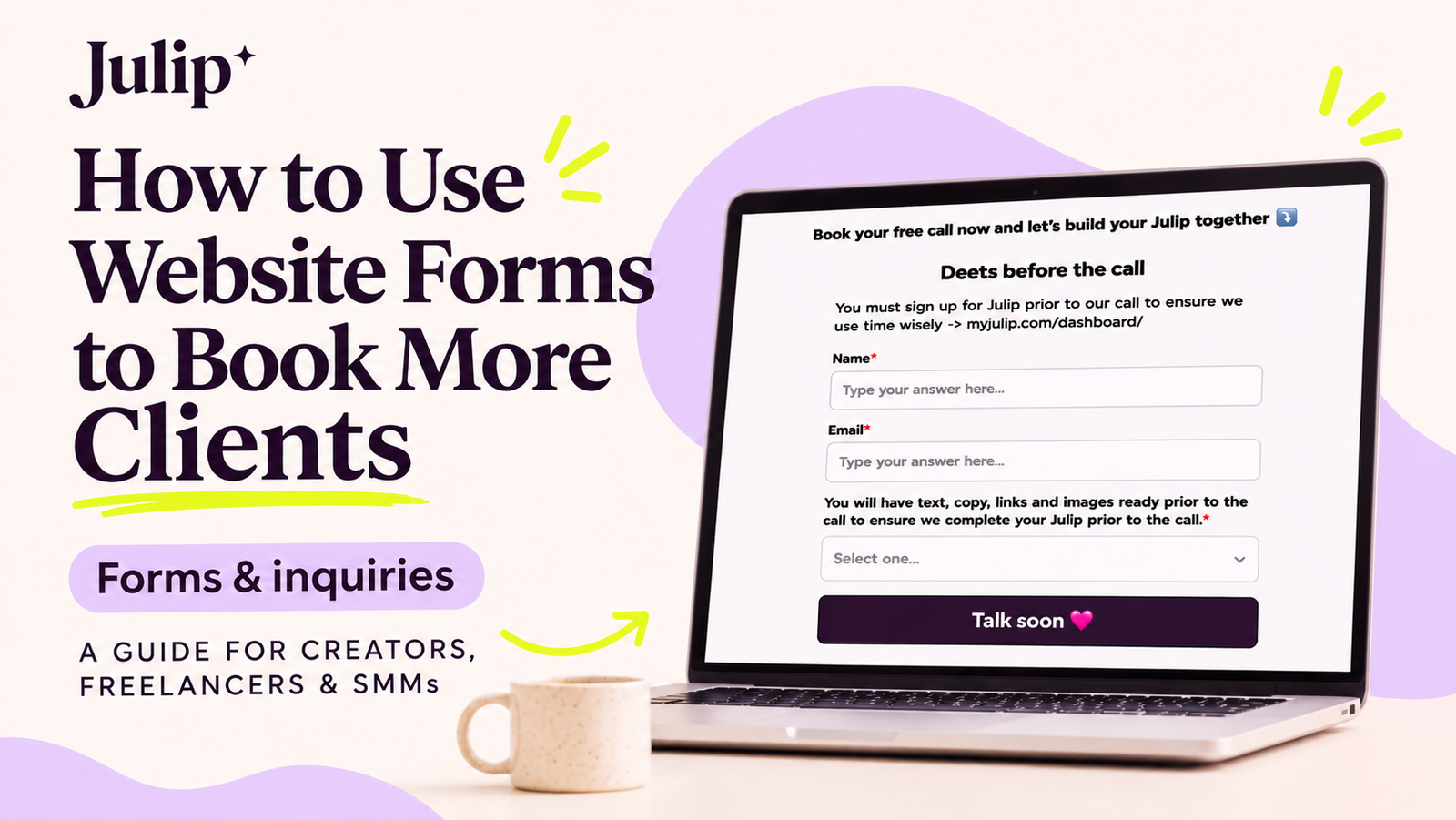
- Make discovery calls more productive: Embed a required form in your Julip booking calendar so clients provide important information before securing a call.
- Reduce back-and-forth emails: Gather project details upfront instead of chasing potential clients for answers.
- Create a more professional client experience: Give potential customers and brand partners a clear, organized way to inquire about your services.
- Turn website visitors into qualified leads: Help interested visitors take the next step toward becoming paying clients.
The bottom line: Julip forms help creators, freelancers, and service providers streamline client inquiries, qualify potential customers, and spend less time on admin.
✨ Where Can You Add Forms on Your Julip Website?
Forms aren't just for collecting someone's name and email address. They're a way to make your business look more professional, streamline your inquiries, and turn interested visitors into qualified leads.
With Julip, you can add forms in three different places.
1. On Your Services Tab
Have multiple services or want to give potential clients a general way to inquire about working together?
Add a form directly to your Services tab so visitors can tell you what they're looking for.
Perfect for: General inquiries, project requests, custom quotes, and new client applications.
2. Inside an Individual Service
Not every service requires the same information.
Someone interested in a full social media management package might need to answer different questions than someone booking a one-time strategy session.
By adding a form to an individual service, you can ask specific questions that help you understand whether someone is a good fit.
Perfect for: Qualifying leads, gathering project details, and understanding budgets before starting a conversation.
3. Inside Your Booking Calendar
This one is a game-changer.
You can embed a form directly into your Julip booking calendar, requiring someone to complete it before they can secure a call with you.
No more hopping onto discovery calls without knowing who you're talking to or what they need.
Perfect for: Discovery calls, consultations, coaching sessions, and potential client meetings.
💌 8 Creative Ways to Use Forms on Your Julip Website
Now for the fun part. Here are some ways different creatives and freelancers can put forms to work.
📱 1. Social Media Managers: Qualify Clients Before the Discovery Call
You're a social media manager, not a professional calendar-filler.
Instead of booking calls with everyone who lands on your website, use a form to understand their needs and whether they're ready to invest in your services.
Questions to ask:
- What is your business or brand?
- Which social media platforms are you currently using?
- What's your biggest social media struggle?
- Are you looking for ongoing management, strategy, or content creation?
- What's your monthly marketing budget?
- When are you hoping to get started?
Where to put it: Inside your Social Media Management service or embedded in your discovery call calendar.
Why it works: You'll know who's serious, what they're looking for, and whether your services align with their budget before spending 30 minutes on Google Meet.
📸 2. Photographers: Make Booking Inquiries a Breeze
Imagine someone lands on your photography portfolio, falls in love with your work, and wants to hire you.
Instead of making them email you and wait for a response, give them a simple inquiry form.
Questions to ask:
- What type of shoot are you interested in?
- What's your ideal shoot date?
- Where would you like the shoot to take place?
- How many people or products will be photographed?
- What's your estimated budget?
- Tell me a little about your vision!
Where to put it: Inside your Photography Packages service.
Why it works: You'll have the information you need to evaluate the project and prepare a personalized quote without five rounds of emails.
🎥 3. UGC Creators: Make Brand Partnerships Easier
Your Julip isn't just a place to showcase your portfolio. It's also a place where brands can take the next step toward working with you.
Add a brand collaboration inquiry form to make it easy for potential partners to share campaign details.
Questions to ask:
- What's your brand name and website?
- What products or services are you promoting?
- What type of content are you looking for?
- How many deliverables do you need?
- Will the content be used organically, in paid ads, or both?
- What's your campaign budget and timeline?
Where to put it: On your Services tab or inside your UGC Content Creation service.
Why it works: You'll get a clearer picture of the opportunity before discussing rates, deliverables, and timelines.
Plus, brands love working with creators who have their business organized.
🎨 4. Graphic Designers & Brand Strategists: Create a Mini Creative Brief
Ever had a client say, "I just want something fun and modern," and then proceed to give you absolutely no direction?
We've all been there.
Use a form to collect a mini creative brief before starting a project or scheduling a consultation.
Questions to ask:
- Tell me about your business.
- What design services are you looking for?
- Do you have existing brand guidelines?
- What brands or aesthetics inspire you?
- What's your project timeline?
- What's your estimated budget?
Where to put it: Inside your Branding or Design Services.
Why it works: You'll walk into conversations with a better understanding of the client's vision, expectations, and project scope.
💻 5. Freelancers: Turn Your Website Into a Client Application
Not every inquiry needs to become a client.
Whether you're a copywriter, virtual assistant, email marketer, or website designer, a client application form helps you identify the projects that make sense for your business.
Questions to ask:
- What does your business do?
- What services are you interested in?
- What are your biggest challenges right now?
- Have you worked with a freelancer before?
- What's your project budget?
- When would you like to begin?
Where to put it: On your Services tab or within a specific service.
Why it works: Instead of chasing every inquiry, you can focus your attention on opportunities that align with your expertise, availability, and pricing.
🎙️ 6. Podcasters: Collect Guest Applications
Forms aren't just for finding paying clients!
If you host a podcast, you can use a form to collect guest pitches and keep potential collaborations organized.
Questions to ask:
- What's your name and area of expertise?
- What topic would you love to discuss?
- Why would this topic resonate with my audience?
- Have you appeared on other podcasts?
- Where can I find you online?
Where to put it: On your Services tab as a guest application or collaboration inquiry.
Why it works: You'll have the information you need to evaluate guest pitches without sorting through endless DMs.
🧠 7. Coaches & Consultants: Make Every Call More Valuable
If you offer coaching, mentorship, or consulting, you probably know that the first few minutes of a call can easily turn into an information-gathering session.
A pre-call form changes that.
Questions to ask:
- What are you currently working toward?
- What's your biggest challenge?
- What have you already tried?
- What would make this session successful for you?
- Is there anything you'd like me to review beforehand?
Where to put it: Embedded directly into your Julip booking calendar.
Why it works: You can show up prepared, ask better questions, and spend more of the session delivering actual value.
💍 8. Event Planners & Creative Service Providers: Collect Project Details Upfront
From event planners and stylists to makeup artists and videographers, some projects have a lot of moving parts.
A detailed inquiry form helps you collect the essentials in one place.
Questions to ask:
- What type of event or project are you planning?
- What's the date and location?
- How many guests or participants are expected?
- What services do you need?
- What's your estimated budget?
- Are there any important details I should know?
Where to put it: Inside your individual service or package.
Why it works: You can quickly assess availability, understand the scope, and determine your next steps.
💸 What Are the Benefits of Using Client Inquiry Forms?
Sure, forms make your website look more professional. But the real benefits go way beyond aesthetics.
1. They Help You Find Better-Fit Clients
Your time is valuable. A few thoughtful questions can help you understand whether an inquiry aligns with your services, rates, and availability.
It's not about making it difficult to work with you. It's about making sure you're spending time on the right opportunities.
2. They Save You From Endless Back-and-Forth
Instead of asking for the same details over and over, you can collect essential information upfront.
Less time in your inbox. More time doing the work you actually get paid for.
3. They Make Your Business Feel More Established
You don't need a massive agency or a 10-person team to deliver a professional client experience.
A polished website, clear services, and an organized inquiry process can help potential clients feel confident about working with you.
4. They Make Discovery Calls More Productive
Imagine starting a call already knowing someone's business, challenges, goals, and budget.
Instead of spending half the meeting gathering basic information, you can jump straight into how you can help.
5. They Help Turn Interest Into Action
Someone might love your portfolio but not know what to do next.
A form gives them a clear next step: Tell me what you need, and let's see how we can work together.
And the easier you make that next step, the less friction there is between someone discovering your work and reaching out.
🌶️ How Do You Create a Client Inquiry Form That Converts?
Before you start adding 25 questions to every service, here are a few things to keep in mind.
- Keep it short and sweet. Only ask questions that help you evaluate an inquiry or prepare for the next step. Nobody wants to fill out a college application just to inquire about a logo.
- Ask about the budget when it matters. If you're offering custom packages or higher-ticket services, knowing someone's budget upfront can help you recommend the right solution.
- Make your questions specific. A photographer and a social media manager shouldn't be asking identical questions. Tailor each form to the service you're offering.
- Give people a reason to fill it out. Instead of a generic "Submit," use inviting language around your form, like "Let's Create Something Together," "Tell Me About Your Project," or "Let's See If We're a Match."
- Put forms where they make sense. Use a general inquiry form for broad requests, service-specific forms for detailed projects, and booking forms when you need information before a call.
Frequently Asked Questions About Forms for Creators and Freelancers inside Julip
What is a client inquiry form?
A client inquiry form is an online questionnaire that collects information from potential customers interested in your services. Freelancers, creators, and small business owners use client inquiry forms to gather details such as project requirements, budgets, timelines, and contact information before starting a conversation.
How can freelancers use forms to get more clients?
Freelancers can use website forms to make it easier for potential clients to inquire about their services. By collecting information about project goals, budgets, and timelines upfront, freelancers can identify qualified leads, respond with more relevant proposals, and create a smoother client booking experience.
What questions should a social media manager include in a client inquiry form?
A social media manager's client inquiry form should ask about the potential client's business, current social media platforms, marketing goals, biggest challenges, monthly budget, and desired start date. These questions help social media managers understand whether a client is a good fit before scheduling a discovery call.
Can I require someone to complete a form before booking a call on Julip?
Yes! Julip allows you to embed a form directly into your booking calendar. Visitors must complete the form before securing their appointment. This is especially helpful for discovery calls, consultations, coaching sessions, and other client meetings where you need information in advance.
Where can I add forms on my Julip website?
You can add forms in three places on your Julip website:
- Services tab: Collect general inquiries from potential clients.
- Individual services: Ask specific questions related to a particular service or package.
- Booking calendar: Require visitors to answer questions before booking an appointment.
This flexibility allows creators and freelancers to customize how they collect information based on the services they offer.
What should a photographer include in a booking inquiry form?
A photography inquiry form should collect the type of shoot, preferred date, location, number of participants or products, estimated budget, and creative vision. These details help photographers assess availability, understand the project, and prepare accurate quotes.
How can UGC creators use forms for brand collaborations?
UGC creators can add brand collaboration inquiry forms to their Julip websites to collect campaign details from interested brands. Useful questions include the brand name, content deliverables, campaign timeline, budget, and intended content usage, including organic social media or paid advertising.
This helps creators evaluate partnership opportunities before negotiating rates and deliverables.
What's the difference between a contact form and a client intake form?
A contact form typically collects basic information, such as someone's name, email address, and message.
A client intake form goes further by asking detailed questions about a potential client's goals, project requirements, budget, and timeline.
For freelancers and creative service providers, intake forms can be especially useful for qualifying leads and preparing for consultations.
Should I ask potential clients about their budget in an inquiry form?
Yes, if budget is important for determining whether your services are a good fit. Asking about budget can help you recommend appropriate packages, avoid mismatched expectations, and prioritize qualified inquiries.
Consider offering budget ranges rather than requiring someone to enter an exact amount. This can make the question easier to answer.
How many questions should a client inquiry form have?
For most initial client inquiries, approximately 5–8 focused questions is a useful starting point. More complex projects may require additional information, but keeping the initial form concise can make it easier for potential clients to complete.
Prioritize questions that help you determine project fit, understand the client's needs, and identify the next step.
Can forms help increase client bookings?
Forms can support client bookings by providing a clear way for visitors to express interest, reducing unnecessary back-and-forth, and helping business owners respond to qualified leads more efficiently.
Forms don't guarantee more bookings, but a simple, well-designed inquiry process can remove friction between someone discovering your services and taking the next step toward hiring you.
Is Julip suitable for freelancers and creators who sell multiple services?
Yes. Julip allows freelancers, creators, social media managers, photographers, and other service providers to showcase multiple services and add forms to individual offerings.
For example, a social media manager could use one form for monthly management inquiries and another for one-time strategy sessions, collecting different information for each service.
🚀 Your Link in Bio Should Do More Than Look Pretty
Your website shouldn't just show people what you do. It should help them take the next step toward hiring you.
And that's exactly why we love forms.
Whether you're qualifying a potential social media management client, collecting brand partnership details, preparing for a photography shoot, or getting ready for a coaching call, Julip helps you create a smoother path from "I'm interested" to "Let's work together."
Because running a creative business already comes with enough moving parts. Finding your next client shouldn't require 17 DMs, six follow-up emails, and a guessing game.
Ready to make your Link in Bio work a little harder?
Head into Julip, add a form to your Services tab, individual services, or booking calendar, and give your next potential client an easy way to get started.
Less admin. Better inquiries. More time for the good stuff.
Now that's a link in bio 👏🏻