The fastest way to add 'Build a Website in a Day' to your services

- Top Freelancer Platforms Reviewed: We rank the best website builders for freelancers like Julip and Squarespace based on ease of use, mobile-first layouts, integrated client booking tools, and monthly value.
- Eliminating Multi-Tool Fatigue: Fragmented tech stacks that force independent contractors to pay for separate scheduling, payment, and portfolio tools quickly drain budgets and cause friction that drives potential clients away.
- Essential Business Features: To successfully book and convert clients from social media, modern freelancers require a streamlined, zero-code hub featuring built-in service menus, immediate checkout options, and 0% platform transaction fees.
The majority of independent contractors fall into one of three categories: having no website at all, having a Linktree with a LOT of random links, or having a Squarespace site that took two months to build but is still uncooperative and not what you wanted.
As this is going on, prospective customers are clicking on your bio link, viewing a wall of ugly links, and moving on. The work is truly excellent. The online presence just isn't doing its job.
Based on what really makes a difference, portfolio display, booking, selling services, ease of setup, and price, this article evaluates the best website builder for freelancers. No fluff or filler. Just a detailed explanation of which tools speed you up and which ones slow you down.
What to Look for in a Freelancer Website Builder?
Not all website builders are designed with independent contractors in mind. The majority are designed for companies with marketing budgets and development teams or just creators. Here are some things that independent professionals should consider before choosing one.
- Show off your magic portfolio: Clients want to see what you can do before they sliding into your DMs. Make sure your portfolio lets you show off your best case studies and past work instantly, cleanly, and with absolutely zero annoying login screens locking things away.
- Bookings and payments on autopilot: If you offer strategy calls, creative consulting, or set packages, you need to get paid without the headache. Paying separate subscriptions for a calendar app, a payment gate, and a tracking tool adds up scary fast and is honestly just a giant hassle you don't need.
- Sell your digital goodies with ease: Whether it’s a quick digital download, a handy template, or a full service bundle, you should be able to list it and sell it right from your link without losing a chunk of your hard-earned cash to sneaky transaction fees.
- Built for the scroll: Let's be real, the vast majority of your audience is finding you through a quick tap on your social media bio. Your page needs to look absolutely stunning and crisp on a phone screen automatically, without you having to play around with annoying mobile formatting sliders.
- Zero code, zero stress: Your time is literally money. You want a tool that lets you go live and start taking orders in a matter of minutes, not something that forces you to battle messy code or spend months crying over broken layout settings in freelance website builders.
The Best Website Builders for Freelancers
The majority of the numerous options available are not worth your effort. The tools listed below were chosen especially for independent contractors who need to appear trustworthy, land jobs, and get paid without making things too complicated.
Julip: Best Overall Website Builder for Freelancers
For freelancers who expand their clientele on LinkedIn, Instagram, or TikTok, Julip is a visual website-in-bio. Without requiring a domain, hosting, or design expertise, it functions as a complete website from a single bio link, showcasing your portfolio, services, booking availability, digital products, and an about page.
Most website builders are generic tools freelancers have to adapt. Julip is built specifically for independent professionals who need to look credible, get booked, and get paid from the link in their social bio.
No developer, no monthly headache, no separate tools.
Using Julip, a wide range of freelancers can showcase their whole portfolios and accept paid reservations straight from Instagram. Coaches and social media managers can set up discovery calls, sell their signature packages, and grow their email lists right from their bio, no complicated third-party tools required.
Key Features:
- Visual portfolio and work samples display in minutes
- Built-in booking and paid calls (no Calendly needed)
- Sell services and digital products with 0% platform fees
- Services menu
- About page
- Visual storefront for affiliates #passiveincome
- Email collector
- Testimonials section
- Brand color customization
- Analytics dashboard
Pros:
- Replaces Linktree, Calendly, a payment processor, and a portfolio tool in one $19/month plan
- You keep 100% of all earnings
- Automatically mobile and desktop ready
- 14-day free trial available
- Average user saves $200+/year compared to running separate tools
Cons:
- It is not the best option if you require a multi-page SEO blog, a highly customized design, or enterprise client administration because it was created for social-first freelancers.
Pricing: $19/month (billed annually) or $25/month. 14-day free trial.
Best for: Designers, authors, marketers, coaches, photographers, videographers, and social media managers that want their bio link to function as a comprehensive company hub and advertise their services on social media.
Squarespace: Best for Freelancers Who Want a Polished Standalone Site
With themes that work well for both professional and creative freelancers, Squarespace is the most design-forward general website builder. For independent contractors who choose a conventional website over a social media presence, it is the default option.
Squarespace is the best option at its pricing point if your clients want a deep multi-page website, a dedicated blog, and a custom domain. If you don’t own one yet, here’s where to buy a custom domain before you connect it.
Key Features:
- 100+ professional templates
- Advanced grid-style drag-and-drop layout builde
- Built-in scheduling via Acuity integration
- E-commerce for digital products and services
- Blogging, custom domain, and reliable hosting
Pros:
- Best-in-class design quality
- Strong all-in-one hosting and e-commerce
- Good for SEO
- Established brand trust with clients
Cons:
- Not live in minutes, setup takes time
- More expensive, especially on e-commerce plans ($23 to $49/month)
- Not built for social-first freelancers
- Transaction fees on lower plans
Pricing: Pricing starts from $25/month, along with a 14-day free trial.
Best for: Reputable freelancers who don't mind a lengthier setup time and who like a professional, conventional website.
Wix: Best for Freelancers Who Want SEO and Local Visibility
Wix is one of the most flexible freelancer website builder options available, with 800+ customizable templates and an app market packed with business tools. Wix Bookings integrated with Google Search and Maps, allowing freelancers' services to appear directly in search results.
This makes Wix a genuinely strong pick for anyone whose clients search Google before searching Instagram.
Key Features:
- Strong built-in SEO tools
- Google Bookings integration
- Free plan available
- Large template library
- Broad app market for add-ons
Pros:
- Great for local SEO and organic discovery
- Google Bookings integration is a real advantage
- Flexible editor with hundreds of templates
- Free plan to get started
Cons:
- Free plan shows Wix branding and ads on your site
- Editor flexibility can create inconsistent layouts if you're not careful
- Add-ons get expensive quickly
- Not designed for social-first freelancers
Pricing: Free plan available. Paid plans from ~$17/month.
Best for: Local SEO or organic search-focused freelancers who prefer that clients find them on Google instead of social media.
Carrd: Best for Freelancers Who Want a Minimal One-Page Site Fast
Freelancers that desire a straightforward portfolio or "about me" page are drawn to Carrd, a straightforward one-page website builder. The Pro plan is among the least expensive paid choices available at $19/year.
Although it won't accomplish everything, it completes tasks swiftly for independent contractors who only need something live today.
Key Features:
- One-page site builder with clean, minimal templates
- Custom domain on the Pro plan
- Free plan available
- Fast drag-and-drop editor
Pros:
- Extremely affordable
- Fast setup, live in under an hour
- Clean minimal design
- Free plan available
Cons:
- No built-in booking
- No digital product sales
- No analytics on the free plan
- No email collection or testimonials section
- Looks good but won't convert visitors into paying clients on its own
Pricing: Free plan available. Pro from $19/year.
Best for: Freelancers with almost no funding who require a fast landing page but don't have any immediate plans to book or sell from the website.
Notion + Super.so: Best for Writers and Knowledge-Based Freelancers
Some independent contractors already reside in Notion, especially authors, consultants, and researchers. Super.so turns any Notion page into a public website with a custom domain, giving them an instant portfolio without leaving their existing workflow.
It's a niche option, but for the right type of freelancer it removes a lot of unnecessary setup.
Key Features:
- Turn any Notion page into a live website
- Custom domain support
- Clean, text-forward design
- Fast setup for existing Notion users
Pros:
- No learning curve for existing Notion users as it’s quite complicated
- Simple, minimalistic design
- Effective for case studies and portfolios with a lot of text
Cons:
- No booking, payments, or selling tools
- No social-first functionality
- Only useful if you already use Notion heavily
Pricing: Super.so from $12/month.
Best for: Researchers, writers, and consultants who wish to use their current Notion workspace for a clean portfolio.
Side-by-Side Feature Comparison
Here's how the top picks compare on the features freelancers actually need.
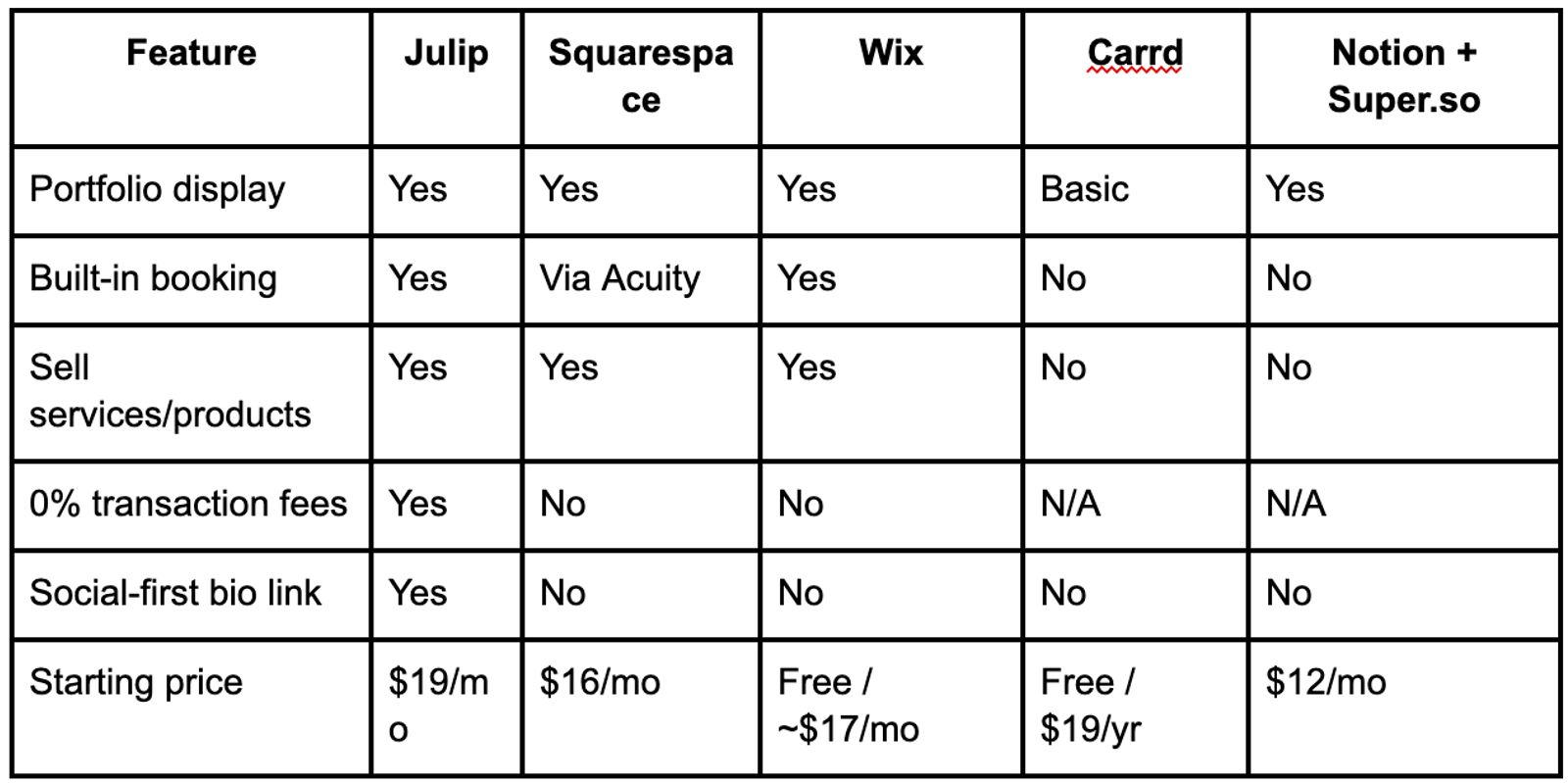
If you're a freelancer who drives clients through social media, the best website builder for freelancers in this list is Julip by a clear margin. It is the only one designed specifically for that particular workflow.
FAQ
Do freelancers need a website?
Yes. Your website is the one place on the internet where you call all the shots. While social media apps are incredible for finding your audience and growing your community, your website is where you actually build your business. With a website, you may sell services, accept reservations, and gather inquiries without relying on any platform. You can convert followers into paying customers with just a one-page website that is linked from your bio.
What is the easiest website builder for freelancers?
The easiest freelance website builder for social-first freelancers is Julip. No design skills, no coding, live in minutes from one bio link. Although it takes longer, Squarespace offers beginner-friendly layouts for a conventional standalone website but it typically takes 1-3 months for people to go from a-z.
Can I take client bookings directly from my freelancer website?
Yes, but not all builders come with this by default:
- Julip: Booking is built in. No third-party tool is required; clients schedule and pay straight from your bio link.
- Squarespace: Booking works via Acuity integration.
- Wix: Has its own native booking system.
- Carrd and Notion/Super.so: No booking functionality at all.
Is there a free website builder for freelancers?
Although Wix's free tier displays platform branding and advertisements, both Carrd and Wix offer free options. A 14-day free trial of Julip's whole feature set, which includes booking, selling, and portfolio capabilities, is available. Before making a commitment, this is the most practical way to evaluate a full-featured freelance website builder.
What is the best website builder for freelancers who sell services online?
Julip is the strongest option. It charges 0% platform fees, includes a built-in storefront, and handles booking and payments all in one place. Squarespace and Wix also support selling but come with transaction fees on lower plans and require more setup time.