The fastest way to add 'Build a Website in a Day' to your services


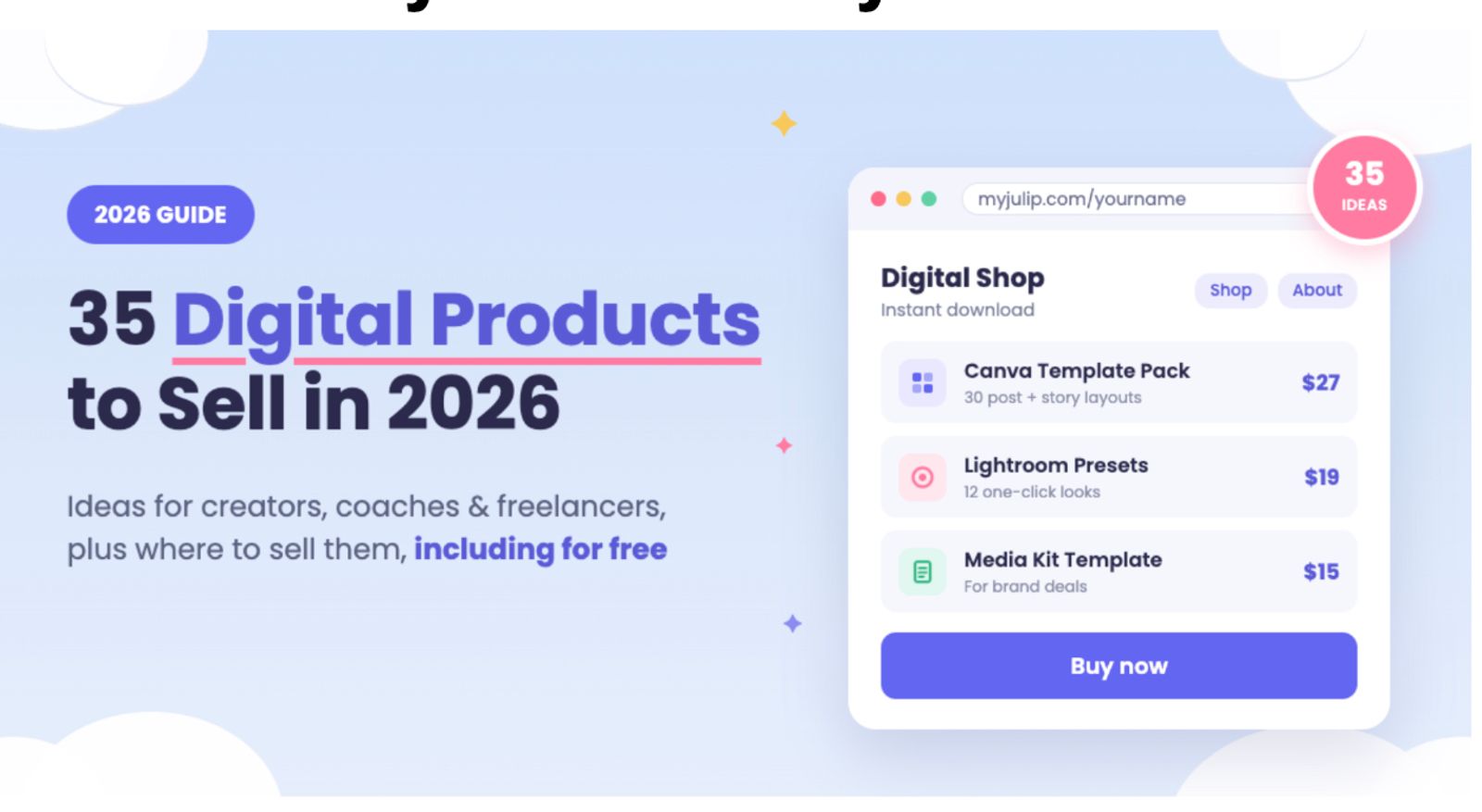
Digital products let you build something once and sell it repeatedly, but they only work when you match them to a specific audience you can actually reach. Here’s what to know before you dive in:
- Start with a skill you already have. The 35 ideas are grouped by who you are (creators, UGC managers, coaches, freelancers, designers, musicians, and wellness niches), so you can skip to your section and ignore the rest.
- Narrow beats broad. A crowded category isn’t a dead end. “Notion templates for wedding photographers” will outsell “Notion templates” because the buyer feels it was made for them.
- The fastest products to make are templates and presets. Canva templates, Notion templates, media kits, and rate cards can be built in one to three days. Mini courses and memberships take longer but carry higher prices.
- You still need an audience. A product doesn’t sell itself. Most creators who do well sell to a few hundred people who trust them, not millions of strangers.
- Validate before you build. Run a poll in your stories, search Etsy and Reddit, or check what your followers keep asking in comments and DMs.
- Where you sell matters. Etsy brings built-in search traffic but takes more per sale and keeps the customer relationship. A bio-link store like Julip keeps the path from your profile to checkout short, and you own the buyer relationship.
- You can start for free. Etsy, Gumroad, and Payhip have no monthly fee, though they take a bigger cut per sale. Julip offers a 14-day free trial with no cut of your sales.
Creators love to say they make money while they sleep. It sounds like a line from a bad ad, and sometimes it is. But the idea underneath it is real: you build something once, and it can sell again and again without you packing a box or answering the same question twice.
This guide gives you 35 digital products to sell, grouped by who you are, so you can find ideas that match skills you already have. You'll also get a list of low-competition picks and a plain look at where to sell them, including free options.
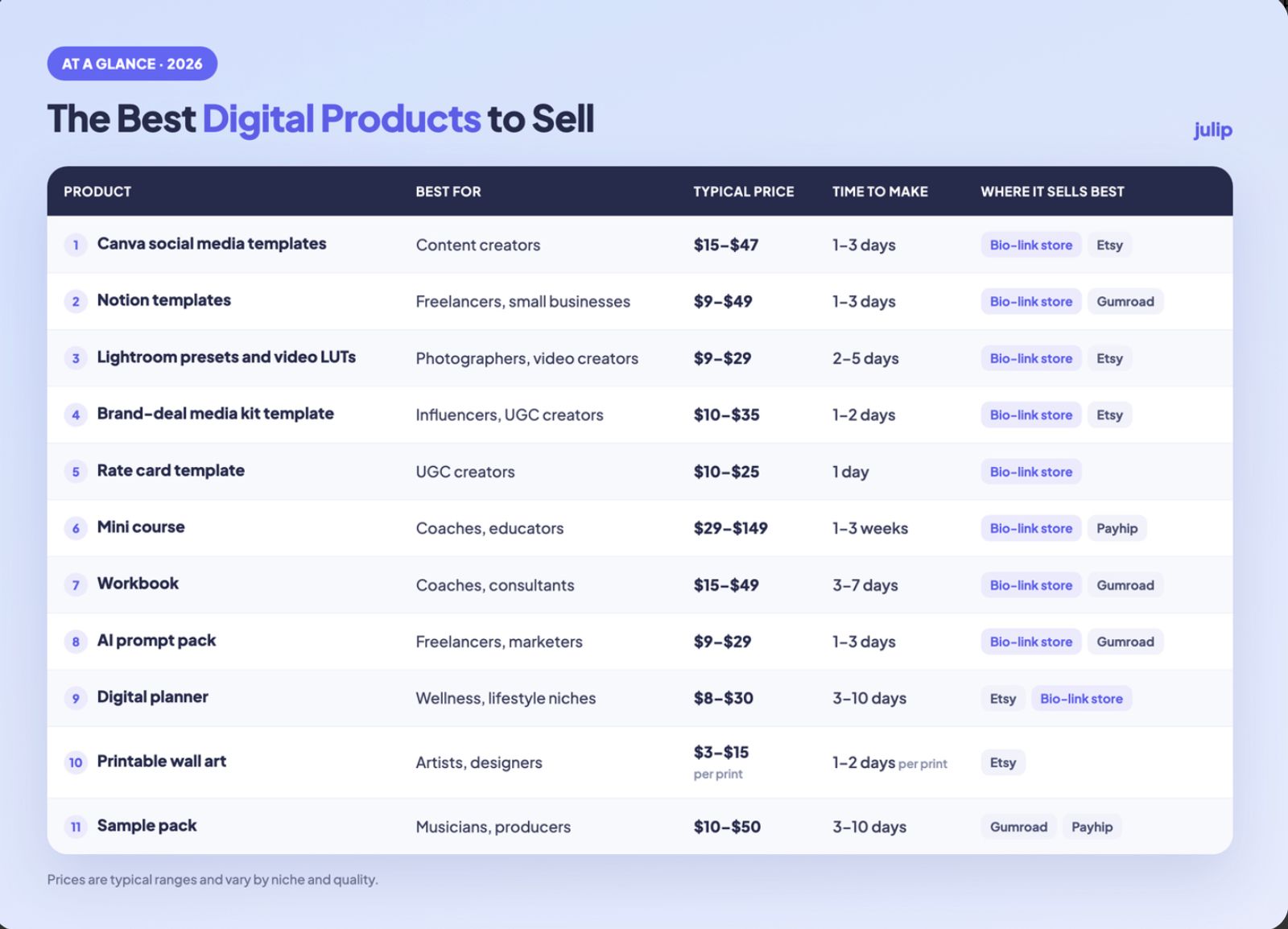
The Best Digital Products to Sell at a Glance
If you only have a minute, start here. These are the strongest ideas from the full list below.
Can You Actually Make Money Selling Digital Products?
Yes. Digital products have no manufacturing costs, no stock to store, and no shipping. Once the file exists, selling it a hundred times costs you about the same effort as selling it once.
The money comes from two things: solving a specific problem for a specific group of people, and knowing where those people already spend time online. Get both right, and you're ahead of most sellers.
Now the honest part. A product doesn't sell itself, and nobody earns anything from a file that sits in a folder. You still need an audience, even a small one, and you still need to tell them it exists. Most creators who do well sell to a few hundred people who trust them, not a few million strangers.
What Makes a Digital Product Worth Selling
Before you pick an idea from the list, run it through these five checks.
- It solves a specific problem. A template for "social media managers sending a first proposal" beats a generic "business bundle" every time.
- It scales without extra work. If every order needs custom time from you, you're selling a service. A product should deliver itself.
- You can reach the buyer. You should know who wants it and where they hang out, whether that's Instagram, TikTok, a newsletter,r or a Facebook group.
- You price by outcome. Charge for the result or the time saved, not for how long it took you to build.
- Buying is easy. If someone has to jump through hoops to pay and download, many of them won't. Discovery to download should take a few taps.
35 Digital Products to Sell, by Who You Are
Prices below are ballpark ranges, and all need a live check before this goes out. The right pick matches a skill you already have and an audience you can already reach, so skip to your section and ignore the rest.
For Content Creators and Influencers
Your feed is your storefront. Anything your followers keep asking you about is a product waiting to happen. If you need a hand with the tools side of things, see our guide to the best tools for content creators.
1. Canva social media templates: Editable post, story, and carousel layouts that other creators can restyle in a few minutes. They sell because plenty of people know what looks good but don't have the time or the design eye to build it themselves.
Typical price: $15 to $47 per pack
2. Instagram and TikTok content calendars: A month of post ideas, captions, and posting slots laid out in a spreadsheet, Notion, or PDF. It sells because the hardest part of posting regularly is usually deciding what to post, not filming it.
Typical price: $10 to $30
3. Brand-deal media kit templates: A ready-made one-pager where a creator drops in their audience stats, past work, and rates. It sells because new creators tend to panic the first time a brand asks for a media kit, and a clean template fixes that fast.
Typical price: $10 to $35
4. Reel and caption hook packs: A list of opening lines and caption starters, sorted by niche or goal. It sells because the first three seconds decide whether anyone keeps watching, and writing strong hooks gets tiring fast when you post every day.
Typical price: $7 to $25
5. Lightroom presets and video LUTs: One-click color looks for photos and video, built around a consistent style. They sell because followers notice a polished feed and ask how you edit it, so your audience is already warm.
Typical price: $9 to $29 per pack
For UGC Creators and Social Media Managers
Clients pay you for results, but they hire you based on how professional you look. These products help you and your peers look the part from the first message.
6. Social media audit templates: A structured document a manager fills in to review a client's accounts, with sections for content, engagement, and gaps. It sells because it makes a freelancer look organized on the very first call and gives them something concrete to hand over.
Typical price: $15 to $40
7. Client onboarding kits: A bundle with a welcome email, an intake form, and an access checklist that gets a new client set up without the back-and-forth. It sells because every freelancer repeats the same first week with every client.
Typical price: $20 to $60
8. Social media manager proposal templates: A proposal layout covering scope, pricing, and deliverables, so nobody starts from a blank page. It sells because a clear proposal wins work, and our guide to the social media manager proposal template shows what a good one includes.
Typical price: $15 to $40
9. Rate card templates: A clean price sheet creators send to brands, with room for posts, videos, and usage rights. It sells because many creators undercharge simply because they don't know how to present their rates without feeling awkward about it.
Typical price: $10 to $25
10. UGC brief templates: A fill-in brief that tells a UGC creator what to shoot, what to say, and what to avoid. Small brands buy it because they want to hire creators but don't know what to ask for, and a brief saves rounds of revisions.
Typical price: $10 to $30
For Coaches, Consultants and Educators
You already sell your time. These products let people learn from you without needing a slot on your calendar.
11. Mini courses: A short video or audio course that teaches one skill in under two hours. It sells because buyers want one clear result they can get this week, not a full semester of material to work through.
Typical price: $29 to $149
12. Paid workshops (recordings): A live session you recorded and now sell on demand. It sells because the content already proved itself with a live crowd, and you only teach it once but can keep selling the replay for months.
Typical price: $25 to $150
13. Workbooks: A guided PDF with prompts and exercises that walks someone through a process step by step. It sells because people finish a workbook far more often than they finish a book, and finishing is what gets them results.
Typical price: $15 to $49
14. Paid newsletters: A subscription email with insight readers can't get for free, sent on a steady schedule. It sells because people will pay for a trusted voice that saves them hours of research and tells them what actually matters.
Typical price: $5 to $15 a month
15. Membership communities: A paid group with ongoing access to you and to other members, usually with live calls or a private chat. It sells because people stay for the company as much as the content, which keeps them paying month after month.
Typical price: $9 to $99 a month
16. Coaching session templates: Agendas, intake forms, and follow-up notes for running paid sessions. New coaches buy them because they want to look polished before they've built a system of their own, and experienced ones buy them to save prep time.
Typical price: $15 to $45
For Freelancers and Small Businesses
Freelancers hate setup work and love shortcuts. Sell them the shortcut.
17. Notion templates: A pre-built workspace for tasks, clients, or content that a buyer duplicates into their own Notion account. It sells because setup is the part most people dread, and a working system on day one feels like a big win.
Typical price: $9 to $49
18. Spreadsheet trackers: Budget, invoicing, and income sheets in Google Sheets or Excel with the formulas already working. They sell because nobody wants to build a spreadsheet from scratch at tax time, and a clean tracker keeps a small business honest.
Typical price: $10 to $39
19. Contract and proposal templates: Reusable agreements and proposal layouts written in plain language. They sell because vague terms cost freelancers real money, and most don't have a lawyer on call. Add a note telling buyers to have a lawyer review them.
Typical price: $15 to $60
20. Email swipe files: A collection of tested emails for outreach, follow-ups, and sales. It sells because staring at an empty draft is painful, and a good opening line can save an hour of rewriting that most freelancers would rather spend elsewhere.
Typical price: $15 to $39
21. AI prompt packs: An organized set of prompts built for one job, like writing product descriptions or planning a week of posts. It sells because most people don't know how to ask well, and a tested prompt gives them a usable first draft.
Typical price: $9 to $29
For Designers, Photographers and Artists
If you make things people can see, there's a good chance others will pay to use them.
22. Stock photos: Photo packs built around a niche or a style, such as cozy home offices or local food. They sell because small businesses want images that don't look like everyone else's, and generic stock libraries often feel tired.
Typical price: $9 to $49 per pack
23. Mockups: Photos of mugs, packaging, or phone screens where a designer drops in their own artwork. They sell because designers want to show their work in a believable setting, and shooting a mockup from scratch takes real time.
Typical price: $9 to $29
24. Fonts and icons: Typefaces or icon sets that come with a clear commercial license. Other designers and small brands buy them to save time and match a look, so a licensing page that's easy to read helps you sell more.
Typical price: $15 to $59
25. Printable wall art: Prints buyers download and print at home or at a local shop. It sells because it's a cheap, instant way to decorate a room, and buyers often grab several prints at once if you offer a bundle.
Typical price: $3 to $15 per print
26. Procreate brushes: Custom brush sets for illustrators who work on an iPad. They sell because artists chase a particular texture or style and would rather buy it than spend weeks building their own, especially if you show it in a time-lapse.
Typical price: $5 to $19
27. Digital stickers: Sticker sheets made for digital planners and note-taking apps. They sell because planner fans buy them by the pack to personalize their pages, and new themes for each season give you a reason to launch again.
Typical price: $3 to $12
For Musicians and Audio Creators
Sound travels well as a digital file, and other creators always need more of it.
28. Sample packs: Collections of loops, one-shots, and drum hits built around a genre or a mood. Producers buy them because they're always hunting for fresh sounds, and a pack with a clear sound is easy to preview in a short clip.
Typical price: $10 to $50
29. Beats (with licenses): Instrumentals sold with clear usage terms, such as a lease or an exclusive. They sell because artists need music and want to know exactly what they're allowed to do with it, so spell the terms out plainly on the page.
Typical price: $20 to $300 or more, depending on the license
30. Guided meditations: Audio sessions for sleep, stress, or focus, usually between five and twenty minutes. Listeners come back to what works for them, which makes these a good fit for repeat sales or a small monthly subscription.
Typical price: $5 to $25 each
31. Sound effects Clips for video editors, podcasters, and game makers, such as whooshes, clicks, and ambient loops. They sell because creators need audio they can use without worrying about rights, and a tidy, well-labeled pack saves them hours.
Typical price: $9 to $29 per pack
For Wellness, Lifestyle and Parenting Niches
These products work best when you already share a routine or lifestyle that your audience wants a piece of.
32. Digital planners and habit trackers: Hyperlinked planners and tracker pages built for a tablet app or for printing at home. They sell because people love a fresh start, and January and September tend to be the busiest months for planner shoppers.
Typical price: $8 to $30
33. Meal plans and recipe ebooks: Weekly menus with shopping lists, or recipe collections built around a theme like budget dinners or high-protein lunches. They sell because deciding what's for dinner wears people down every single day, and a ready plan takes that choice off their plate.
Typical price: $9 to $29
34. Workout guides: Training plans in PDF form, built for one goal and one level, like beginner strength at home. They sell because people want structure without paying a personal trainer every week. Keep your claims modest and avoid promising results.
Typical price: $15 to $49
35. Kids' printables: Activity sheets, chore charts, and learning games that parents and teachers can print at home. They sell because the same family prints them again and again, so themed bundles do especially well around holidays and back to school.
Typical price: $3 to $15
Low-Competition Digital Products to Sell
A crowded category doesn't mean you should avoid it. It means you should narrow it. "Notion templates" has thousands of sellers. "Notion templates for wedding photographers" has far fewer, and the buyer feels like you made it just for them. A smaller audience that actually fits tends to beat a huge one that doesn't care.
Here are a few ways to shrink a crowded idea down to one audience:
- Notion CRM for wedding photographers, instead of "Notion templates"
- Lightroom presets for pet photographers, instead of "Lightroom presets"
- Rate card template for UGC creators, instead of "business templates"
- Canva Instagram templates for real estate agents, instead of "Canva templates"
- Content calendar for dental and medical clinics, instead of "content calendars"
- Meal plans for night-shift workers, instead of "meal plans"
- Sample pack of lo-fi study beats, instead of "sample packs"
How to Check Competition in 3 Steps
- Search Etsy for your idea. Look at how many listings come up. A handful with real reviews is a good sign, because it shows people buy. Zero results can mean no demand, and thousands mean you should narrow further.
- Check Reddit for unanswered requests. Search the subreddit for your niche and look for people asking "does anyone have a template for this?" Repeated questions with no good answer are a strong signal.
- Look at what your own audience asks you. Scroll back through your comments and DMs. The questions people keep sending you are the best market research you'll get, and it's free.
How to Sell Digital Products Online, Step by Step
You don't need a big launch or a fancy setup. You need a clear product and a place to sell it. Here's the order that works.
- Pick a product from skills you already have. Start with what you know or what your audience keeps asking about. Skip trends you can't back up with real experience.
- Check that people want it. Run a quick poll in your stories, look at competitors, or offer a pre-sale before you build anything. Even five people saying "yes, I'd buy that" is useful.
- Build a simple first version. Solve the main problem and stop there. You can improve it later based on what buyers tell you. Free design and editing tools are plenty for most first products.
- Set a price based on the result. Think about the time or money you save the buyer, not the hours you spent. Start with one clear price so people aren't comparing tiers.
- Set up somewhere buyers can purchase in a couple of taps. You need a spot that stores your files, takes payment, and delivers the download on its own. Where that spot lives matters more than most people expect, so that's what we cover next.
- Send every link to one place. Whether traffic comes from Instagram, TikTok, email, or search, point it all at a single page. A good link in bio for Instagram does this job well, and our roundup of the best link in bio tools compares your options.
Where to Sell Digital Products (Including for Free)
The best place to sell depends on where your buyers come from. If people find you by searching, a marketplace can bring them to you. If they already follow you on Instagram or TikTok, a page linked from your profile usually works better. For a wider look at the options, see our guide to the best creator monetization platforms, or our list of Stan Store alternatives if you're comparing pricing.
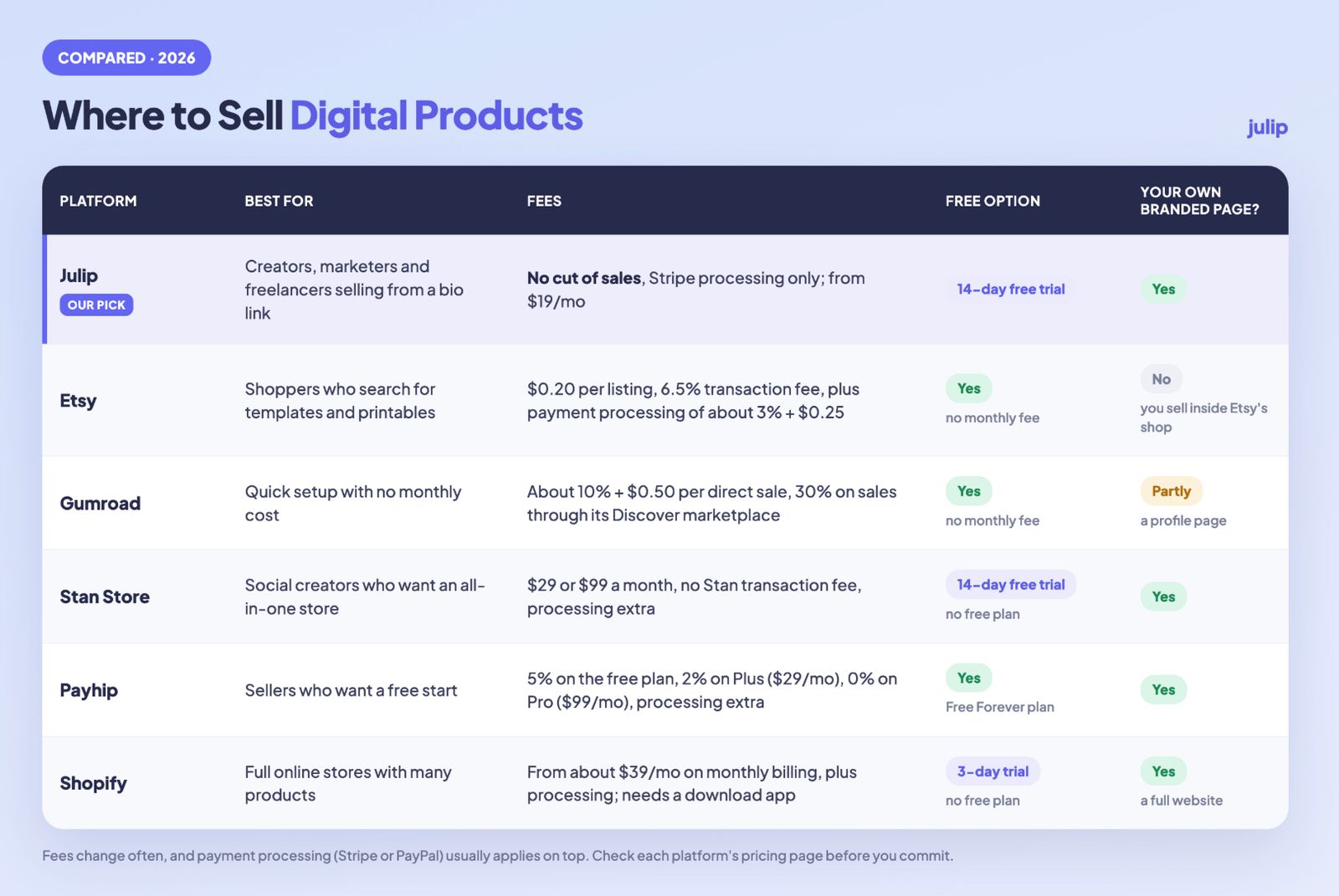
Fees change often, and processing fees from Stripe or PayPal usually apply on top of platform fees, so check each pricing page before you commit. If you want to sell without paying anything upfront, Etsy, Gumroad, and Payhip let you start for free. Just know that the free routes tend to take a bigger cut per sale.
Selling Digital Products on Etsy
Etsy makes sense when you want built-in search traffic. Millions of people go there looking for templates, planners, and printables, so you don't need an existing following to get a first sale. The trade-off is cost and crowding. You pay a listing fee, a transaction fee, and payment processing, and your listing sits next to hundreds of similar ones. Etsy also owns the customer relationship, so you can't easily send those buyers an email later. It's a good place to test an idea, but a hard place to build a brand.
Selling From Your Bio Link
If your buyers come from social media, a page one tap from your profile usually converts better. Someone who just watched your Reel is warm. Sending them to a marketplace, where they search and compare, adds steps and gives them time to drift away. A bio-link store keeps the path short: tap, see the product, pay, download. You also keep the relationship, because the buyer came to you directly, and you can collect their email along the way. That's the idea behind Julip.
How to Sell Your Digital Products With Julip
Julip is a website-in-bio tool built for creators, freelancers, and coaches. It gives you one page that works as your link in bio and your website, with no coding, no custom domain, and no hosting to set up. It takes no cut of your sales, so you only pay Stripe's processing fee, and plans start from $19 a month with a 14-day free trial.
Here's what you can set up:
- A visual storefront that shows each product with an image, a description, and a price
- Stripe payments so buyers pay you directly
- A freebie section to collect emails from people who aren't ready to buy yet
- A booking link for calls or services
- An about section and testimonials to build trust with new visitors
Want the step-by-step version? Our help center walks through how to sell a digital product on Julip.
See It in Action
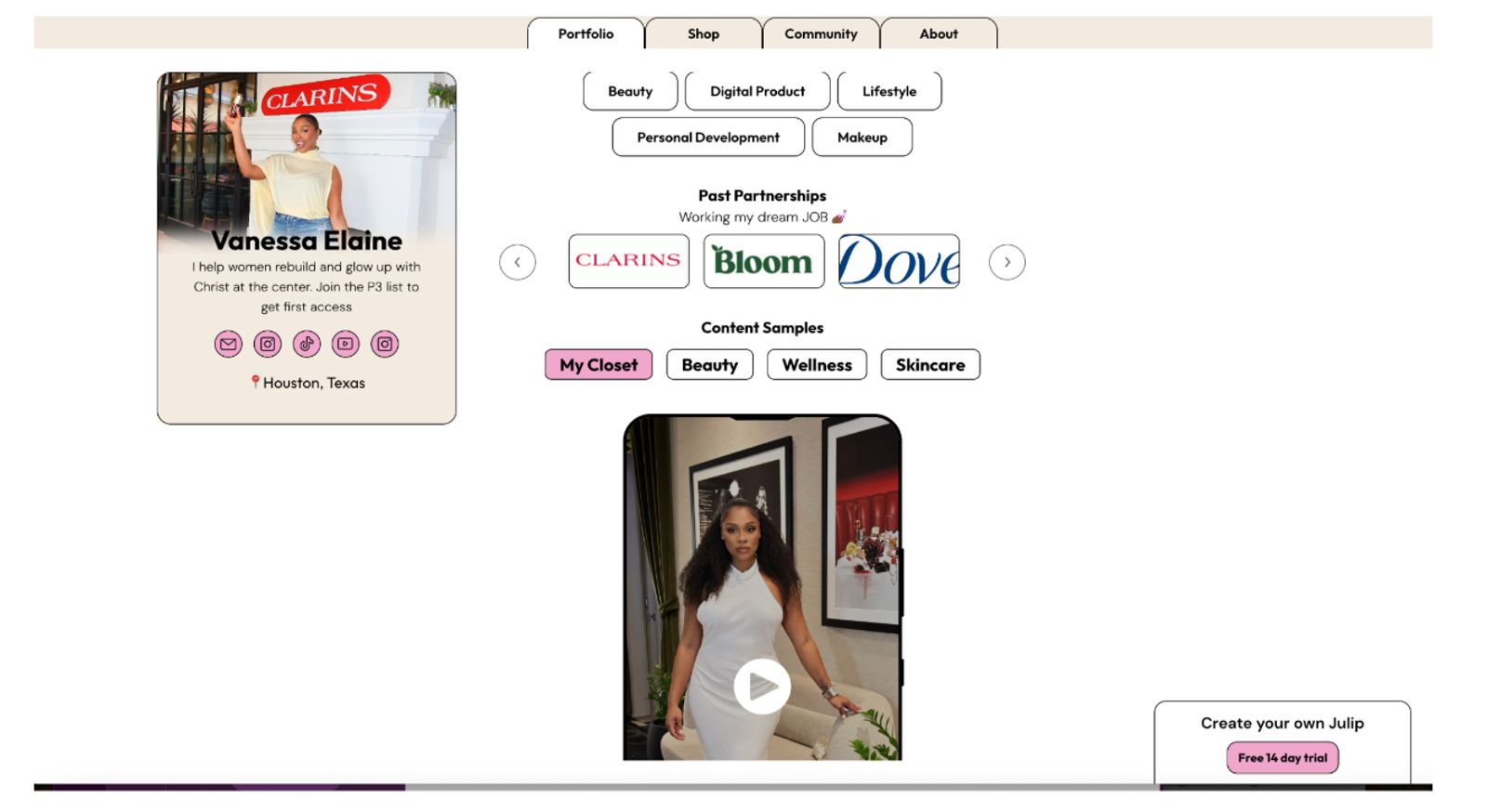
Vanessa sells faith-rooted self-growth guides to her audience of over half a million women, from “That’s Just Not You Anymore”, a $39.99 guide to breaking toxic patterns, to The Boundaries Navigator Guide at $9.99. She also offers a free daily tracker that collects emails from followers who aren’t ready to buy yet. See Vanessa’s Julip page.
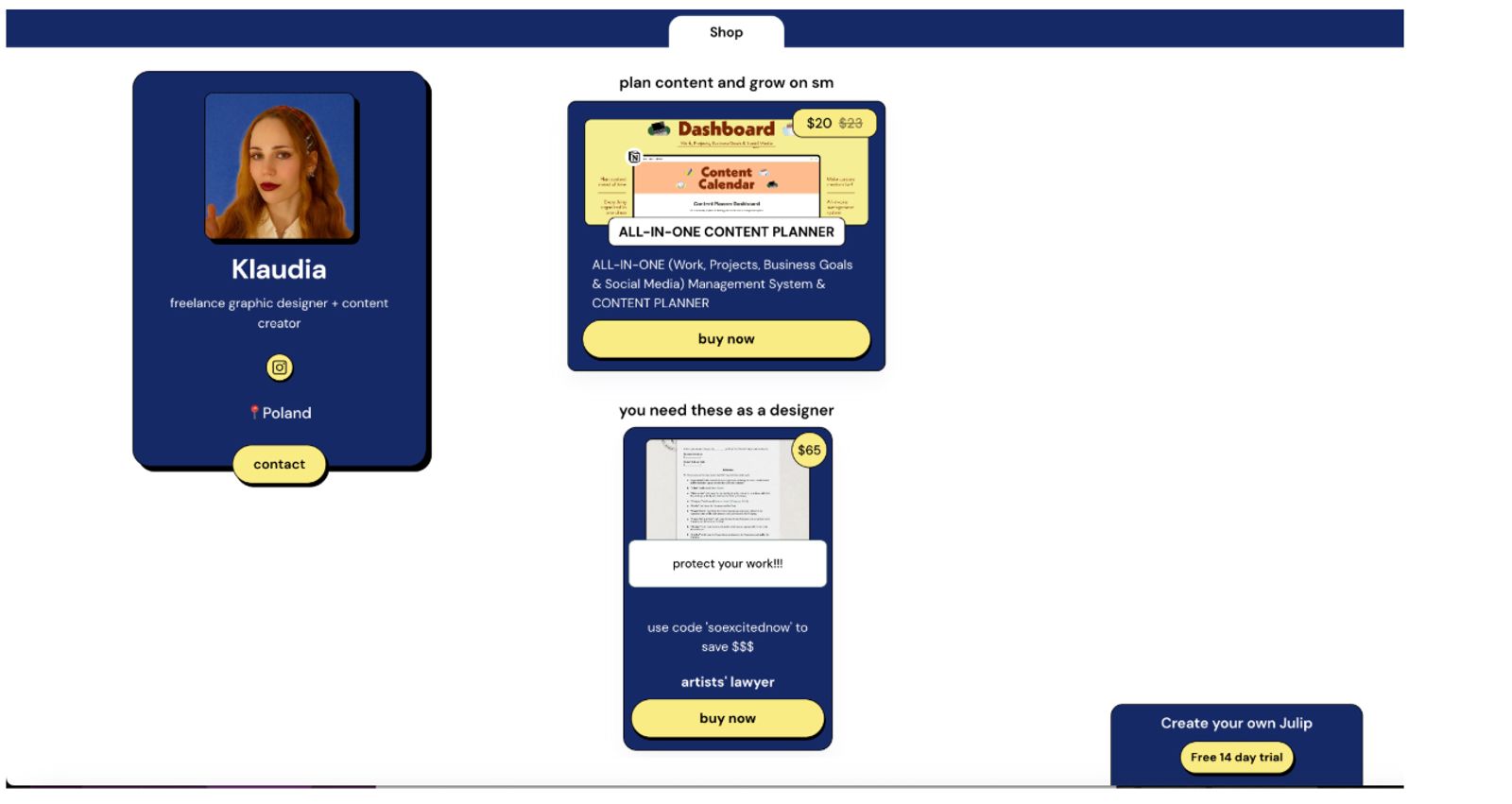
Klaudia sells an All-in-One Content Planner for $20, a Notion system for managing client work, projects, business goals and social media in one place. The same page links to the design resources she recommends and to her newsletter sign-up. See Klaudia’s Julip page.
FAQ
Can you make money selling digital products?
Yes. Digital products cost very little to deliver once they're made, so most of what you charge is margin. The catch is that the product has to solve a real problem for people you can actually reach. A great file with no audience earns nothing, while a simple file with the right audience can sell for years.
What digital products are the most profitable to sell?
Templates, presets, courses, and memberships tend to do well because they save buyers time or help them get a clear result. Profit depends less on the format and more on the fit. A narrow product for a defined audience, priced by outcome, usually beats a broad one.
How do I start selling digital products with no audience or money?
Start with a skill you already have and make one small product. Validate it with a poll or a few conversations, then sell it through a low-cost setup like a bio-link store. You can build an audience while you sell by posting about what you're making and who it helps.
Where can I sell digital products for free?
Etsy, Gumroad, and Payhip all let you start without a monthly fee, though they take a cut of each sale or charge listing fees. Julip offers a 14-day free trial with no cut of your sales. The cheapest option depends on how much you sell, so check each platform's fees before you pick one.
Do I need a website to sell digital products?
No. A bio-link store works as a simple website without the work of building one. You get a page with your products, checkout, and email capture, all linked from your Instagram or TikTok profile. That's exactly what Julip is built for, and you can set it up without writing any code.
What digital products sell best on Instagram and TikTok?
Anything that solves a problem your followers already mention. Templates, presets, content calendars, mini courses, and planners all do well because they're easy to show in a short video and easy to buy in a few taps. Demo the product in a Reel, then point people to the link in your bio.
Conclusion
The sellers who do well with digital products aren't always the ones with the biggest followings. They pick one specific problem, solve it clearly, and make it easy to buy. That's the whole game.
You already have a skill, a question people keep asking you,or a system you use every week. Turn it into a product, put it where your audience can find it, and let it work in the background. When you're ready, try Julip free for 14 days, no credit card needed.